



Fans want the match as it happens, not only short clips after it ends. When a club can live-stream a football match on its own website, families, scouts, and sponsors can watch. The page can also share the lineup, kickoff time, and match notes next to the video.
This article explains how to live-stream a football match with WordPress as the home base. It covers simple gear, solid upload speed, and the video delivery layer that keeps playback smooth. It also touches on match rights, since sports broadcasts can be copied and re-shared without permission.
Other articles about fitness and sports streaming:
Why streaming on a WordPress site matters
A live stream keeps supporters connected to the team, even when they can’t attend in person. The club site can host the stream, a match preview, and the post-match report. This makes the stream part of the club’s story.
Social platforms can help with quick reach, yet those platforms still decide what viewers see. YouTube says its recommendation system ranks content based on signals such as watch history and engagement. Meta also describes feed ranking as the process that orders stories so people see what is most relevant at the top.
A WordPress site gives the club more control over the match experience. Plugins can add features, and themes control how pages look, so the stream, access rules, and match info can live side by side. Cisco forecasts that video will account for 82% of all IP traffic in 2022, so video-friendly pages require careful planning.
Match rights matter as much as camera gear. WIPO notes that illegal re-streaming is growing online and harms the value of sports broadcasts. Some competitions publish rules about live rights and protection from unauthorized use, so permissions should be checked early.
What a club needs before kickoff
Equipment basics can stay simple. Many teams start with a phone or a camcorder on a tripod. A DSLR can look great too, yet the biggest win is a steady wide shot so viewers can track play without shaking. A mic can help commentary stay clear, and a spare battery pack helps avoid sudden dropouts.
Internet requirements come next, and upload speed (how quickly data leaves your location) matters most. YouTube’s encoder guidance lists bitrate ranges (video data rates) by resolution and also recommends running a speed test to check upload bitrate. A club aiming for HD often targets at least 5–10 Mbps upload at the venue and leaves extra headroom for safety.

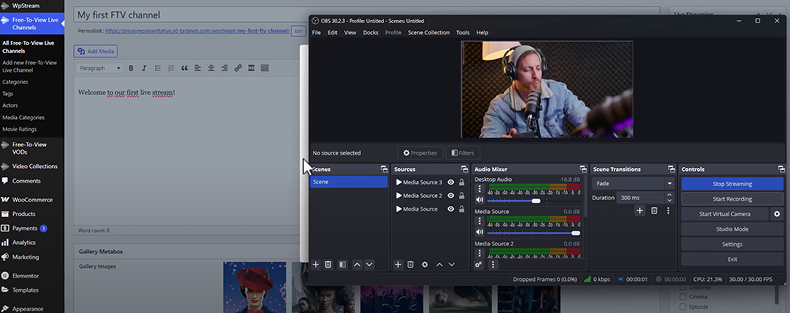
The encoding setup is the bridge between the camera and the server. Many clubs use OBS Studio[10] because it is free and open-source software for video recording and live streaming. Hardware encoders exist, yet software encoders are often enough at the start.
A small setback can teach a lot. One academy once set the bitrate higher than the field’s upload could handle, so the picture froze during quick counterattacks. The next match used a lower bitrate and a wired link, and the stream held up. YouTube also advises testing before the event, using motion and sound that match the real match.
How live streaming works behind the scenes
Live streaming follows a chain: camera, encoder (converts video to a digital stream), streaming server (distributes video online), player (plays video for viewers), and viewer. Each step has a job. If the encoder drops out, the server has nothing to send. If the player can’t cope with the connection, the viewer gets stalls.
RTMP is a common protocol for sending a live feed from an encoder to a streaming server. Wowza describes RTMP as a protocol used in live streaming workflows. YouTube lists RTMP/RTMPS as the protocol used for encoder streaming, which matches what many services use for ingest.
WordPress itself is not a streaming server. WordPress handles pages, posts, and users, and plugins add extra features on top of that core. For viewing, many services package video in the HLS format. Apple describes HLS as designed for reliability and says it adjusts playback for the available connection speed. Mux also explains that HLS splits video into short segments and lets the player switch quality when bandwidth drops. That layer keeps the WordPress host from doing work it was not built to do.
Choosing the right way to stream
Some teams stream only on YouTube or Facebook because the setup is fast and fans already have accounts. The trade-off is that the match takes place in someone else’s app, and platform ranking determines who sees the stream and when.
Other teams embed a platform stream on their site. This keeps the match on a WordPress page with club branding and notes around the player. The stream still relies on an external platform for uptime, player controls, and links that may distract viewers.

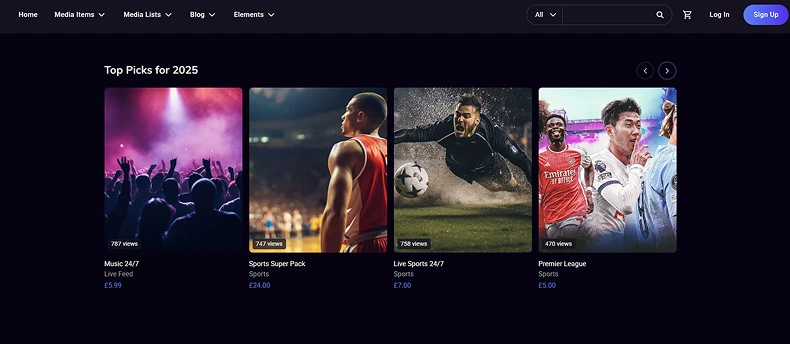
A site-owned stream gives the club the most control. The match can be shown on a club page with a login wall, a ticket gate, or a members’ area. It also supports better long-term content plans, since the same page can later host highlights, a replay, and a match report. This is the core idea of live-streaming football on-site, not only on social media.
Setting up WordPress for match day
Hosting choices shape the viewer experience. Basic shared hosting can work for standard pages, but live video experiences traffic spikes when the match starts. A smart setup keeps WordPress focused on the match page and uses streaming delivery for the video itself.
Speed matters because many fans watch on phones. Google says 53% of visits are abandoned if pages take over 3 seconds to load. Keep the match page light—compressed images, simple layout, only necessary plugins.

The video player needs to work on mobile and handle changing connections. Apple says HLS is designed for reliability and adjusts to wired and wireless connection speeds. That helps a fan keep watching when the phone switches from stadium Wi‑Fi to mobile data.
A match page should feel complete. A theme controls layout without changing the core software, so a theme with clean templates can place the player, a short preview, and a kickoff countdown in a stable layout. Plugins can add SEO basics and caching, since plugins extend the site by adding features. This kind of setup supports a real-time sports page that can rank in search results.
Preparing the stream before going live
Camera placement defines viewing. A wide shot near midfield helps viewers see plays. A steady pan is easier to track than fast zooms. Many teams mark the tripod spot to maintain consistent angles.
Audio can be simple or layered. Crowd sound alone can work if the wind is controlled and the mic is not rubbing on clothing. If commentary is used, the voice should be clear over whistles and music. A short sound test with real crowd noise can catch problems early.
Graphics, like a score bar, are optional but help fans follow the match. OBS can layer text and images on video so a club can add team names, a clock, or a small sponsor logo. Keep overlays small so the pitch is visible on phones.
Going live without panic
Connecting the encoder (video converter) usually means pasting the server URL and stream key (a unique code for the session) into the encoder and starting the stream. YouTube’s encoder guide lists RTMP/RTMPS and shows bitrate ranges (amount of data sent per second) by resolution, which is close to what many services ask for. Stream keys should be treated like passwords and kept private.
Testing should be done before fans arrive. YouTube recommends a test that includes movement and audio like the real event. Many clubs also watch the test on phones using mobile data, since this mirrors how many supporters watch from outside the stadium.
A small checklist can keep the stream steady:
- The match page should be ready before kickoff.
- The player should load
- The page should be stable, and the text should be readable on mobile. Simple themes and clean blocks help the page handle match traffic.

Avoiding mistakes and building a long-term stream
Small mistakes cause most failures. Unstable Wi‑Fi, dead batteries, or wrong bitrate ruin streams. Good plans include backups, tests, and rights checks, since live video is valuable and rights owners push back on unauthorized streams.
Monetization can be simple and fair. Some clubs sell single-match access, others sell monthly memberships, and others keep streams free and sell sponsor spots on the match page. WpStream documentation describes pay-per-view live channels, where viewers pay a fee for each event, and the plugin listing describes monetization via WooCommerce.
Owning the stream can change a club’s future. When matches stream on the club site, the club can link to signups, posts, and the store. Plugins add features like e-commerce, and themes maintain a consistent look. This approach builds a true fan home, not just a shared link.
WpStream fits best after the basics are clear. You can live stream on your site without adding load to your hosting server, and docs list embedding tools and paid access options. A simple workflow is: create a channel, connect an encoder, embed the player on the match page, and then go live. And just like that, you can live stream a football match on your very own site.