
Trading Room Streaming
Live Stream Trading Sessions on Your Own Website
Share your charts. Sell the seat. Keep the replays.
Trading educators and signal services live stream sessions for paying members on their WordPress site. Each session is recorded for later viewing.
Pre-Market Levels
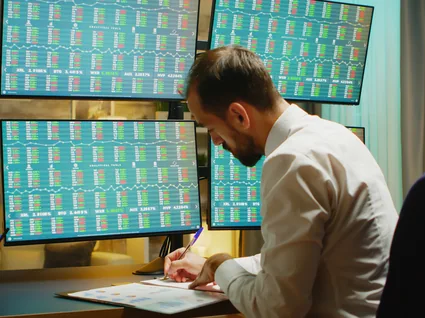
Streaming from Your Trading Room WebsiteYour trading room on your own site
Share your charting screen
Use OBS to capture your charting app with Window Capture or share your screen via your browser. Your live stream goes to a WpStream channel on your site.
Restrict member access
Sell room access through WooCommerce as a monthly subscription or a single session. Only paying members can view the player.
Record each session
Start recording before the channel goes live. After the session, publish the recording as a free or paid video on demand for your members.
Members watch the session on your domain
Your WordPress site hosts the trading room and member area. WpStream handles video delivery, so your web host does not serve the live traffic.
The Short Answer
How do you live stream trading sessions to paying members?
Capture your charting screen and voice using broadcasting software like OBS. Send it to a WpStream channel on your WordPress site.
Sell access with a WooCommerce subscription or a single-session product, so only paying members can see the player. Record each session for replay.
A live trading room on your site is a members-only page, with each session saved as a replay.
This setup works for trading educators, courses with live sessions, signal services, or communities running Q&A.
What WpStream Doesn't Do: Execute trades, send alerts, or give advice. Its role is to deliver your session video to members.
Run a Pre-Market Session from Your Charts
Set up your charting screen, OBS, a WpStream channel, a members page, and the replay. Prefer not to use OBS? Share your screen from the browser.

Capture
Use Window Capture for the charting app
This option shows only the selected window, even if other windows are open. Display Capture shows the entire monitor.
Connect
Set OBS to your channel
In OBS, go to Settings, then Stream. Set Service to Custom and paste your channel’s server URL and stream key. Ensure the channel is active before connecting OBS.
Go Live
Open the members page
Turn on recording before starting the channel. The player appears on your restricted page via the WpStream Player block, an Elementor element, or a shortcode.
Replay
Publish the recording
After the session, the recording will appear under WpStream, then Recordings. You can make it a free or pay-per-view video for members who missed it.
Details That Save a Morning Session
Window, Not Screen
Window Capture keeps other windows, account screens, and pop-ups off the stream. On a Mac, OBS recommends Display Capture instead.
No OBS? Use the Browser
Click "Go live from browser," then select "Screen share" to send your charts without OBS.
Auto TURN ON
Enable this once before starting the channel. In the next session, open OBS and click Start Streaming.
Keyframe Interval
Set 2 seconds for normal streaming and 1 second for Low Latency (beta). Use different settings for each.
Test Streams Count
Test streams count against broadcast hours since the channel is active. Keep them short to save hours for members.
Readable Charts
Before the open, ensure price labels and levels stay clear in a phone-sized window.
Where does your trading room run today?
If you currently stream live sessions on YouTube, Zoom, or Discord, they operate on public streams or servers. Payment and replays may be on separate platforms.
On your own site, you decide: who can watch, the cost, and where member accounts and replay libraries are located.
| Decision | On a platform you use today | On your own site with WpStream |
|---|---|---|
| Decision: Who can watch | On a platform you use today: Set by that platform's membership, invite or link tools | On your own site with WpStream: Members with an active subscription or a purchase |
| Decision: How members pay | On a platform you use today: That platform's own membership options, or a separate checkout | On your own site with WpStream: WooCommerce with Stripe or PayPal, on your site |
| Decision: Where replays live | On a platform you use today: On that platform, under its terms | On your own site with WpStream: Your Recordings list, published as free or paid video on demand |
| Decision: Whose page members open | On a platform you use today: The platform's page and branding | On your own site with WpStream: Your domain, your WordPress page |
| Decision: Delay | On a platform you use today: Set by that platform's delivery | On your own site with WpStream: About 20 seconds, or 2-5 seconds with Low Latency (beta) |
Five Ways to Sell a Seat in the Room
Selling live stream trading sessions? Pay-per-view requires WooCommerce; recurring billing needs WooCommerce Subscriptions, a paid extension. Our guide covers the checkout process.
Monthly Room Subscription
Sell access as a Simple Subscription product. Only active subscribers can access the live stream. Test it yourself, even as admin.

One Session or Workshop
Create a pay-per-view channel. Buyers see the player; others see the Add To Cart button. Example: a paid weekend workshop on chart reading.

One All-Access Pass
Global Subscription Mode links one subscription to the entire site, giving access to all live sessions and replays.

A Room per Topic
Multiple Subscription Plans allow each plan to have its own channels and replays. Example: a "Futures room" plan and an "Options room" plan.
A Free Taster Session
Run a free-to-view channel before members pay. Free viewing still counts against your hours. If you're on MemberPress or Paid Membership Pro, add a free channel to the restricted page.

What Members Get in the Room
A live trading stream is a teaching and review session, not a signal feed. Members see your charts and hear your reasoning, with a delay of about 20 seconds.
More on Low Latency Streaming.
About 20 Seconds Behind
Expect a delay of around 20 seconds. Plan your session considering this gap.

Low Latency (Beta)
This setting reduces the delay to about 2-5 seconds. Set the OBS keyframe interval to 1 second when activated.

The Trade-Off
Members using weak Wi-Fi or mobile data may face buffering. However, those watching live prices have "a second source of information," which supports using low latency.

Alerts Go Elsewhere
Time-sensitive alerts should be sent through a dedicated channel. The room is for teaching and review.

Chat and Q&A
Live chat is managed through the Better Messages integration in the Hello WpStream theme, which is optional.

A Guest Analyst
Front-end broadcasting allows certain non-admin roles to go live from their own page. For example, a lead trader and a guest analyst can each have their own channel.

Replay Library
Sessions saved as replays for members
After a session, a recording made with Record Live Stream will appear in your Recordings list. You can download the file or make it a free, pay-per-view, or subscription video on demand.
Each recap joins the replay library.
Two Notes on Replays. A pay-per-view workshop needs an extra step: switch the product to Video on demand and select the recording. Everyone who bought it retains access.
And recording hours measure the archive you keep.
Video unavailable. Please try again later.
Sizing a Daily Room
How many hours does a daily pre-market session use?
Three metrics apply to live stream trading on WpStream. Per the pricing page, "Broadcast Hours count the live streaming time, and Viewer Hours count the viewer watch time", both per month.
Recording hours limit the archive you maintain.
Example: A 90-minute pre-market session from 8:00 to 9:30 a.m. ET before the NYSE opens, on each trading day of October 2026.
The NYSE and Nasdaq calendars show no closures between Labor Day (September 7) and Thanksgiving (November 26), so all 22 weekdays trade. Assume 40 members watch each session.
Test streams add broadcast hours since the live channel is active. Viewer hours only count when viewers watch. The table does the math.
| Hour type | Calculation | October 2026 | Lite | Plus |
|---|---|---|---|---|
| Hour type: Broadcast hours | Calculation: 22 sessions x 1.5 h | October 2026: 33 h | Lite: 33 of 100: fits | Plus: 33 of 250: fits |
| Hour type: Viewer hours | Calculation: 40 members x 33 h | October 2026: 1,320 h | Lite: 1,320 of 500: over | Plus: 1,320 of 2,000: fits |
| Hour type: Recording hours added | Calculation: 22 recordings x 1.5 h | October 2026: 33 h added to the archive | Lite: 33 of 25: over | Plus: 33 of 100: fits |
| Hour type: Smallest plan for all three | Calculation: All three hour types checked | October 2026: 33 / 1,320 / 33 h | Lite: No | Plus: Yes: Plus |
Live streaming for traders, on your own WordPress page. WpStream delivers the video.
Lite
Lite is $24 a month or $190 a year for 100 broadcast and 500 viewer hours, 200 viewers at once, 5 live channels, and 25 recording hours.
Three sessions a week (Monday, Wednesday, Friday: 13 in October 2026) would use 780 viewer hours at 40 members. Lite suits fewer members or shorter sessions.
Plus
Plus is $59 a month or $490 a year for 250 broadcast and 2,000 viewer hours, 1,000 viewers at once, 15 live channels, and 100 recording hours.
This plan covers the example for up to 60 members. Replays exceeding 100 recording hours in month four require deleting old ones to free hours.
The trial
New accounts receive 100 Viewer Hours, 20 Broadcast Hours, and 10 Recording Hours to get started. One-Time plans start at $36, and resources from one-time purchases do not expire.
See the pricing page.
Before You Charge
Whose Rules Apply When You Sell a Trading Room?
Your Charting Platform. As of September 2026, TradingView allows its charts "during video broadcasts" as long as attribution is "clearly visible at all times". Its data-provider agreements ban distributing market data for compensation, except where allowed.
Read them before you charge.
Market Data. Exchanges license live and delayed data differently. For example, Nasdaq's data policies (Version 2.6, checked September 2026) use a 15-minute delay. Want to show live exchange prices? Check your data provider's terms.
Payment Providers. Stripe’s list (September 2026) bans "Get rich quick" schemes and misleading testimonials. Its Japan list prohibits advisory services on "how to profit through trading". PayPal’s policy (last updated October 2022, checked September 2026) requires pre-approval for "Live Streaming/Broadcasting".
Your Country. Rules about promoting financial products or giving investment advice vary. In the UK, the FCA’s guidance (FG24/1, March 2024) covers influencers promoting regulated products.
This page is not financial or legal advice.
Nine Checks Before You Live Stream Trading Sessions
Run this checklist the evening before the pre-market session, then again before members join.
For Trading Educators and Signal Services
06
Chart attribution visible if required by your charting platform’s terms.
08
Your own disclaimer on the room page, visible to members before the session.
09
After a pay-per-view workshop, switch the product to Video on Demand; prune old replays.
Charts shared, members in, replay kept: the room is ready for the open.
More for Your Trading Room
How to Share Your Screen on a Live Stream
Go live from the browser and share your charting screen for a live trading session, no OBS needed.
How to Sell Access to Live Streams on Your Website
WooCommerce pay-per-view vs subscription for members-only sessions and workshops.
How to Sell Webinar Replays on WordPress
Turn recorded sessions into a paid replay library for your members.
Live stream trading, answered
A normal stream reaches viewers “after about 20 seconds”. With Low Latency (beta) on, that drops to “roughly 2-5 seconds”. However, members on weak Wi-Fi or mobile data may experience buffering.
Use live trading sessions for teaching and send urgent alerts through a dedicated channel.
Yes, through the Better Messages integration in the Hello WpStream theme.
The plugin’s changelog shows its built-in chat was removed in version 4.14.0. So, live chat for your room now comes from that integration.
The theme is optional for streaming, so consider it if members’ Q&A matters to you.
Yes, if you turn on Record Live Stream before the channel goes live. The recording appears in your Recordings list, and you can publish it as free, subscription, or pay-per-view video on demand.
For a pay-per-view workshop, switch that product to Video on Demand and select the recording; buyers keep access. Kept replays count against recording hours.
Yes. Sell the room as a Simple Subscription channel (this needs WooCommerce Subscriptions, a paid annual extension) and the workshop as a pay-per-view channel.
For a single pass that covers the whole room, WpStream’s Global Subscription Mode ties one subscription to every session and replay on the site.
Example: 90-minute sessions on October 2026’s 22 trading days with 40 members watching use 33 broadcast and 1,320 viewer hours, adding 33 recording hours.
On WpStream’s September 2026 pricing, Plus is the smallest plan covering all three; Lite runs out of viewer and recording hours. The hours table shows the math.
Check two sets of terms before you charge for live stream trading.
TradingView’s terms (September 2026) allow its charts in video broadcasts with visible attribution and forbid distributing its market data for compensation.
Exchanges license their data and treat delayed data differently, so check your data provider’s terms too. WpStream carries the video; checking those terms is up to you.
Yes. Run the taster on a free-to-view channel, then sell the full room by subscription or pay-per-view.
Free-to-view means your members don’t pay to watch; per the plugin page, “it does not mean the streaming service is free”, so a free WpStream session still uses viewer hours.
Yes. With front-end broadcasting, you choose which non-admin user roles can stream. They go live from their own page without access to the WordPress admin dashboard.
The plugin can auto create one channel for each user, so both a lead trader and a guest analyst can have their own channels.
Ready when you are
Start your free trial
Try live broadcasting and replays on your website.