
Live Group Coaching
Live Coaching for Group Programs on Your Own Site
Package your program and let paying clients in. Coach live from your site.
Run live coaching calls and workshops on your WordPress site with WpStream. Only paying clients can join, and you can sell the recordings as replays.
Week 3 Group Coaching Call
Broadcast from Your Coaching WebsiteLive coaching in three steps
Put the call on your site
Create a live channel and place its player on your program page. Go live from your browser or OBS.
Let paying clients in
Sell a ticket for one session or a subscription for the whole program via WooCommerce. Clients who haven't paid will see "Add To Cart."
Coach live and keep the recording
Switch on recording, turn the channel on, and start coaching. After the call, the recording becomes the replay for your group.
Your group call plays on your page
Clients log in and watch coaching sessions on your own site. WpStream handles video delivery, so your web host does not serve the live traffic.
Group sessions, streamed on your own site
A group call, workshop, or cohort session streams at a set time on your website. Only paying clients can access the page, and the recording stays for replay.
The 2025 ICF Global Coaching Study shows that 47% of coaches use digital platforms mainly for one-on-one sessions (35%) and client management (23%). Group sessions aren’t mentioned.
A 90-minute session can run in four parts: check-in, short lesson, hot seats, and action items. The check-in and lesson work well for broadcasting, while hot seats require the client to be on camera.
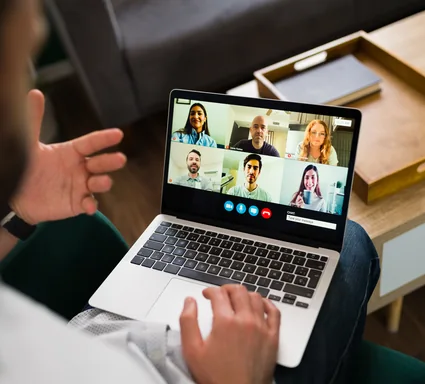

Run a Group Program on Your Own Site
Set up three things for each program: the live channel, the WooCommerce product clients buy, and the program page where coaching plays. The WpStream plugin is free to install.
Streaming runs on a paid WpStream account, and you can test it with a free trial. For a basic webcam broadcast, setup “can take three minutes or less,” plus some time for payments.

Channel
Create the program's live channel
Add a new channel in WpStream. Each channel gets its own page or you can place the player on your program page.

Access
Attach the ticket or the program
Sell one session as a pay-per-view product or attach the channel to the program's subscription with Attach to Subscription. Subscriptions require the WooCommerce Subscriptions extension.
Live Call
Go live with the recording on
Turn on Record Live Stream in Channel Settings before starting. Then click "Go Live With Your Webcam" or use OBS.

Replay
Give the group the replay
After the call, change the product type from Live stream to Video on Demand and select the recording. Clients who bought the call keep access.
Shape a 90-Minute Group Call
Check-in
Discuss wins and context from the week with the whole group.
The Lesson
Teach this week's framework to everyone at once.
Hot Seats
The client you coach needs to be on camera. Use Zoom for this part and stream it to your channel.
Questions in Chat
Clients can type questions via Better Messages in the Hello WpStream theme. You’ll respond about 20 seconds later.
Action Items
Set tasks for the week and name who reports back at the next call to maintain accountability.
Recording On
Check the record setting before starting the channel. It can’t be changed while running.
Pick the Right Tool
Which Tool Does What Job?
A coaching practice has four jobs: one-to-one calls, booking, live group sessions, and replays. No single tool handles all four well.
WpStream covers broadcasting and the replay library on your site, while WooCommerce manages orders. For one-on-one calls, keep a video-call tool like Zoom.
| Coaching job | Own WordPress site with WpStream | All-in-one coaching platform | Video-call tool |
|---|---|---|---|
| Coaching job: Paid access to a live group session | Own WordPress site with WpStream: Session ticket or program subscription through WooCommerce | All-in-one coaching platform: Packages and programs sold on the platform | Video-call tool: No checkout; sell access with another tool |
| Coaching job: Replay you can sell | Own WordPress site with WpStream: Recording becomes a paid or free on-demand video | All-in-one coaching platform: Recordings kept on the platform | Video-call tool: Zoom recordings on Pro; selling them needs another tool |
| Coaching job: One-to-one calls | Own WordPress site with WpStream: No | All-in-one coaching platform: Through Zoom, Meet or a built-in room | Video-call tool: Yes, two-way video |
| Coaching job: Booking and scheduling | Own WordPress site with WpStream: No; pair it with a booking tool such as Calendly | All-in-one coaching platform: Often built in | Video-call tool: Schedules meetings; Zoom Scheduler adds a booking page |
| Coaching job: Where clients watch | Own WordPress site with WpStream: A page on your own website | All-in-one coaching platform: The platform's portal or a call link | Video-call tool: The call app, on camera |
| Coaching job: Who holds the client list | Own WordPress site with WpStream: You: WooCommerce customer accounts on your site | All-in-one coaching platform: Your account on the platform | Video-call tool: Meeting invites, no customer store |
What WpStream Doesn’t Do
And What Coaches Use Instead
No One-to-One Calls
WpStream is a one-way broadcast. Clients can’t speak in the stream. Use Zoom for private sessions.
No Booking or Scheduling
WpStream lacks a calendar or booking system. Use tools like Calendly for scheduling.

Hot Seats Need a Call Tool
For clients to talk on camera, run the call in Zoom and stream it.
Six Ways to Sell a Live Coaching Offer
Access runs through WooCommerce on your site.
Session Ticket
Sell one live call as a pay-per-view product. Buyers access the call from their confirmation email or My Orders.

Program Subscription
One subscription per group program. Attach the program's channel and replays.

All-Access Pass
Global Subscription Mode opens every live call and video for one subscription.

Membership You Already Run
Place a free channel on a restricted page for existing members.

Paid Saturday Workshop
Sell a one-off workshop as a separate pay-per-view product.

Private Password Page
Use a password-protected page for small free groups, but paid access is better for security.

During the Call
Your clients watch from your page
They log in to view the live coaching call in the player. Clients aren’t on camera and don’t speak in the stream.
Display Viewer Count shows how many clients are watching. Typed chat comes from Better Messages, which needs its WebSocket license. The video reaches clients about 20 seconds after you speak, or 2-5 seconds with Low Latency.
Video unavailable. Please try again later.
Turn Every Group Call into a Replay Library
Hosting your coaching videos on your own site allows you to keep each replay behind the same access as the live call.
The pricing page describes recording hours as "The total recording time available for storing saved videos in the cloud." This refers to stored videos, not airtime.
Broadcast and viewer hours are counted monthly. Clients watching replays use viewer hours, while recording hours represent a standing cap.
Record Before You Go Live
Turn on "Record Live Stream" under Channel Settings before the channel starts.
The recording will show under Recordings after the call ends. It uses recording hours from your plan. Wait a few minutes for it to appear.

Put the Replay on the Same Product
The recording won’t appear on the live product alone. Change the product from Live Stream to Video on Demand and select the recording under "Choose Video."
For program subscriptions, attach the replay to the same plan.

Sell a Replay on Its Own
From the recording, create a new Pay-Per-View VOD and sell it to clients who missed the call.
You can also make a free VOD from a strong session to attract the next cohort.

Build the Replay Vault Page
The VOD list shortcode, widget, or block will display your on-demand videos on one page. Upload older program videos as .mp4 or .mov.
For example, a monthly 2-hour mastermind call with 12 members adds 2.25 recording hours each month, including sound check. Recording runs while the channel is active.
At this rate, the vault will exceed Lite’s 25 recording hours by month 12.
The live month remains small: 2.25 broadcast hours and about 48 viewer hours, assuming each member watches 2 hours of older calls, well within Lite limits.
Keep Recording Hours in Check
For example, a year of four 6-week cohorts (two 90-minute calls weekly), twelve 3-hour workshops, and twelve 2-hour monthly calls, each with a 15-minute sound check, totals about 150 recording hours if nothing is deleted.
That exceeds Plus's 100 hours, even though the busiest live month has about 23 broadcast and 768 viewer hours, with 20 clients per cohort, 60 workshop buyers, and 12 members on the monthly call, all fitting within Plus limits.
Download and delete what no longer sells (deleting frees recording hours), or upgrade to Pro, which offers 500 recording hours.

Live coaching runs on hours: your live month and your replay library.
Lite
Lite: $24 a month or $190 a year. It includes 100 broadcast hours, 500 viewer hours, and 25 recording hours.
For instance, a 6-week program with two 90-minute calls a week, plus a 15-minute sound check, with 20 clients, half rewatching once, totals about 17.5 broadcast and 450 viewer hours in the busiest month, using 21 recording hours in total.
It fits, close to the limit.
Plus
Plus: $59 a month or $490 a year. It offers 250 broadcast hours, 2,000 viewer hours, and 100 recording hours. With 25 clients, expect about 563 viewer hours, while other hours remain unchanged.
Alternatively, keep 20 clients and add a paid 3-hour Saturday workshop for 60 buyers, half rewatching: that’s about 20.75 broadcast and 720 viewer hours that month, using 24.25 recording hours. Both fit within Plus.
The trial
The free trial offers 100 viewer hours, 20 broadcast hours, and 10 recording hours, with all features and no credit card required. All paid plans include pay-per-view.
Prices were checked on the pricing page on 27 September 2026.
Starting Out
How to Start a Life Coaching Business with Live Programs
Package a group program or cohort instead of selling single hours.
Group coaching programs often run weekly live calls with peer accountability, in groups of eight to fifteen participants. Niche, certification, and insurance are separate steps.
Run live coaching sessions on a program page of your own site. Clients can pay with a ticket per workshop, a subscription per program, or the membership you offer.
For community engagement, add Better Messages chat in the Hello WpStream theme (it requires the Better Messages WebSocket licence).
Decide what happens to the recordings. Each call can join a replay library for the next cohort or be packaged as a bonus for the current group.
A single session sold once is done. A replay library that grows with each program can keep generating sales.
More for Coaching Programs
How to Sell Access to Live Streams on Your Website
Sell a ticket for one group call or workshop step by step, so only paying clients can watch it on your site.
Video Membership Website: Restrict Access in WordPress
Put an entire program behind a subscription, and switch a live call to Video on Demand so paying clients get the replay.
How to Sell Webinar Replays on WordPress
Sell recordings of live sessions after the date to clients who missed the call or want to watch it again.
Questions coaches ask before going live
It depends on the task. For one-to-one sessions and small calls, a video-call tool like Zoom works well.
If free reach on social platforms is the goal, you’ll need a different tool.
For paid live coaching in groups, with replays to sell, a broadcast on your own site, like WpStream, is built for that.
No. WpStream broadcasts one way to a page on your site. It doesn’t support private two-way calls, booking, or intake forms.
Keep a video-call tool and a booking tool for those needs. The streaming plugin handles the live coaching session for the group and the replays.
Yes. You can sell each session as pay-per-view or the whole program as a subscription through WooCommerce.
Access is linked to each client’s account, so you can revoke one without affecting others. WpStream’s Lock to Website setting keeps the player on your site.
A password page is weaker, as passwords can be shared.
Yes. Turn on recording before the call.
Afterwards, sell the recording as a pay-per-view video, add it to the program subscription, or switch the live product to Video on Demand so buyers retain access.
Each recording counts against your plan’s recording hours, which measure stored video.
They can type but not be on camera. Chat is provided by Better Messages in the Hello WpStream theme, needing the Better Messages WebSocket licence.
The video reaches clients about 20 seconds after you speak, or roughly 2-5 seconds with Low Latency, a beta feature.
For hot seats, run the call in Zoom and stream it to your channel.
For one-to-one and small groups, it often is. However, Zoom doesn’t sell access or host a paid replay library on your site.
As the group grows, you’ll want to charge for access, and the recordings will become a product. That’s where a broadcast on your site fits better.
The two can work together: WpStream can carry a Zoom call to your program page.
Package a group program or cohort, decide where the sessions will run, choose payment methods (a ticket per workshop, a subscription per program, or a membership), and plan what happens to the recordings.
With WpStream, the sessions will run on your site, and the recordings will form a replay library. Niche, certification, and insurance are separate steps.
For example, with its assumptions: two 90-minute live coaching calls a week, 20 clients, and the channel on 15 minutes early for a sound check (test streams use broadcast hours), with half the group rewatching each call once.
This totals about 17.5 broadcast and 450 viewer hours in the busiest month, using 21 recording hours for the program.
It fits WpStream Lite: 100 broadcast and 500 viewer hours monthly, with 25 recording hours.
Ready when you are
Start your free trial
Try live broadcasting and replays on your website.