
How to Create a Video Streaming Website
What it really costs to create a video streaming website: WordPress plugin vs hosted platform vs custom build, priced side by side, plus the hosting you need.

Estimated reading time: 15 minutes
Video streaming is one of the most popular ways to watch content today, which is why knowing how to create a video streaming website is a trending topic. Viewers want to watch anytime, anywhere, on whatever device is in reach, and that means there is still room for new platforms to grow. Our video on demand setup guide covers the library side.
If someone wants to build their own streaming website, it’s easier than it sounds. With the right plan, tools, and content strategy, anyone can set up a professional streaming site that attracts and keeps viewers. This guide explains what it takes to go from idea to launch.
You can also check out how I built a my video streaming website without any ‘coding’ involved.

What It Costs: The Three Routes Compared
Most guides leave out the number you need before anything else. There are three ways to build a streaming site, the price gap between them is enormous, and most of it hides in platform fees rather than the sticker price. Every figure below comes from the vendor’s own pricing page, checked in July 2026.
| Route | Cost to start | Ongoing | Cut of your sales |
|---|---|---|---|
| WordPress plus a streaming plugin | A domain and standard WordPress hosting, plus WpStream Lite at $36 as a one-time purchase (100 broadcast hours, 500 viewer hours, 200 simultaneous viewers, 5 live channels) | Nothing, unless you want your quotas to reset: Lite is $24 a month or $190 a year, and the ceiling is Ultra at $449 a month (50,000 viewer hours, unlimited simultaneous viewers) | None. You keep whatever your payment processor does not take |
| A hosted all-in-one platform (Uscreen, as a published example) | $49 a month on Starter | $149 a month on Growth (listed against a regular price of $199), $449 a month on App Essentials | $1.99 per subscriber on Growth and $0.99 on App Essentials, plus 10% of one-time sales on Starter and 5% above it |
| A custom build from scratch | Cleveroad, an agency that publishes its own estimate, budgets 999 development hours and $97,000 and up at $50 an hour, with 343 of those hours going to the admin panel alone | A developer on retainer for updates, security and breakage | None, but every bug is now yours |
A Worked Example: 500 Members at $10 a Month
Say the site works and you reach 500 paying members at $10 a month, so $5,000 in monthly revenue. On Uscreen’s Growth plan that is the $149 subscription plus $1.99 per subscriber, which is $995, for $1,144 a month in platform fees before your payment processor takes its own percentage. On the WordPress route, WpStream Pro at $169 a month plus a membership plugin (MemberPress Launch is listed at $199.50 for the first year, about $17 a month) comes to roughly $186 a month plus hosting.
One honest caveat, because it is the thing people get wrong: on the WordPress route the limit you hit first is not the number of members, it is viewer hours. Pro includes 10,000 of them, so 500 members watching 20 hours a month fits almost exactly. Heavier viewing means moving up a plan, and even Ultra at $449 a month is well under half the platform fee in the example above. Work out the hours your audience will really watch before you pick a plan, not the headcount.
Start with a Clear Vision
Every great streaming site begins with a clear goal. Think about who it’s for. Is it for sports fans, film students, church members, or gamers? Focusing on a single audience helps build loyalty and differentiate your brand in a crowded market.
Pick a niche that excites you. Maybe your platform features indie filmmakers, live concerts, or cooking lessons. Knowing what makes it special will guide every decision that follows.
Also, decide what kind of videos you’ll host. Will they be original, licensed, or user-generated? If you use others’ content, ensure you have the necessary streaming rights. Protect your own work with copyright and DRM tools to prevent unauthorized downloads.
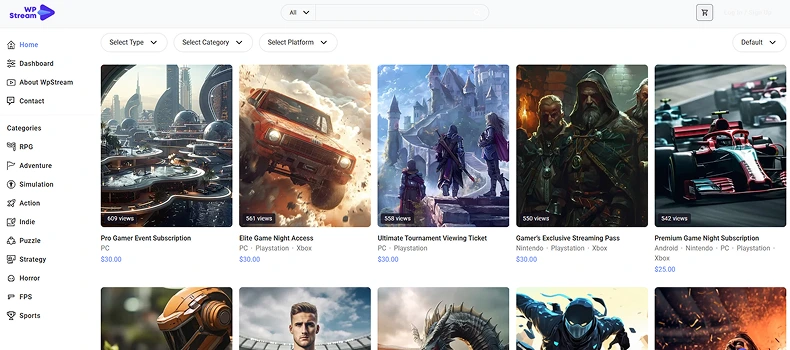
If you’re a gamer, check out how I build an eSports Platform in just a few minutes

Ways to Earn from Streaming
There are three standard monetization models:
- Subscription (SVOD): Users pay a monthly or yearly fee for access, similar to Netflix.
- Pay-Per-View (TVOD): Users pay a one-time fee to watch an event or film.
- Ad-Supported (AVOD): Free for viewers, but ads generate revenue.
Many creators start with one model and expand later. Think about what your audience prefers. Some will pay for ad-free viewing, others don’t mind ads if the content is free. Check out this article on the 7 ways Streamers Monetize without Ads or Donations:
Design the Viewer Experience
Once the vision is clear, plan the website. A good streaming site feels simple, fast, and enjoyable to use.
Key Pages
- Homepage: Shows featured and new videos, plus a search bar.
- Library or Categories: Groups videos by topic, genre, or creator.
- Video Page: Displays the player, title, and description, along with options such as likes, comments, and related videos.
- Account Page: Let users manage subscriptions, profiles, and favorites.
A clean layout and easy navigation make people stay longer. Avoid clutter and keep menus short.
Smooth Video Playback
Video quality is everything. Use a player that supports adaptive streaming (HLS or DASH) so videos adjust to the viewer’s internet speed. Test on phones, tablets, and TVs to ensure playback works everywhere.
Add simple controls, including play, pause, captions, and volume. Viewers should never struggle to make a video work.
Make It ‘YOU’
Once your library grows, add search and recommendations.
A “Because You Watched” section encourages users to explore your content. To brand it even further, add your logo to your player or customize the player itself. Find out how you can do that here:
Choose Your Tech Setup
Domain and Hosting
Start with a domain name and standard WordPress hosting. The useful thing to understand here is what your host does not have to do. When a streaming service like WpStream ingests and delivers the video, the video never touches your server: your host serves pages, while the stream travels from your encoder to the platform’s infrastructure and out to viewers from there. So you do not need a media server, an RTMP server, or video-grade bandwidth on your hosting plan, and ordinary shared or managed WordPress hosting is enough to launch on.
What to actually check before you buy: a current PHP version (WordPress recommends PHP 8.3 or greater, with MariaDB 10.11+ or MySQL 8.0+), free HTTPS certificates, daily backups, and enough monthly bandwidth for normal page traffic. What to ignore: hosting upsells promising “streaming-ready” servers. Those only matter on the one route where you serve video files from your own machine, and that is also the route where the bill grows with every viewer you add. It is the fastest way to make a streaming site expensive.
For very large projects, cloud platforms like AWS or Google Cloud offer more flexibility and global reach, at the cost of managing the delivery pipeline yourself.
Streaming Tools
Streaming requires special tools to deliver video efficiently:
- Encoder: Converts large files or live feeds into web-friendly formats. Free software like OBS Studio works well for live streams.
- Protocols: RTMP sends live video to servers; HLS delivers it smoothly to viewers. Most platforms use both.
- CDN (Content Delivery Network): Distributes videos across a global network of servers, reducing lag and buffering.
If that sounds complicated, many platforms, such as Mux, Vimeo, or WpStream, handle these details for you.
Build vs. Use Existing Systems
The three paths are priced out in the table above. What separates them day to day is how much control you keep and how much you have to maintain:
- Build from scratch – complete control, but needs strong tech skills.
- Use WordPress with plugins – quick to start, flexible, and affordable. Plugins like WpStream with MemberPress, or WooCommerce can handle streaming, subscriptions, and security.
- Use SaaS solutions – platforms like Uscreen or Muvi do everything for a monthly fee, but offer less customization.
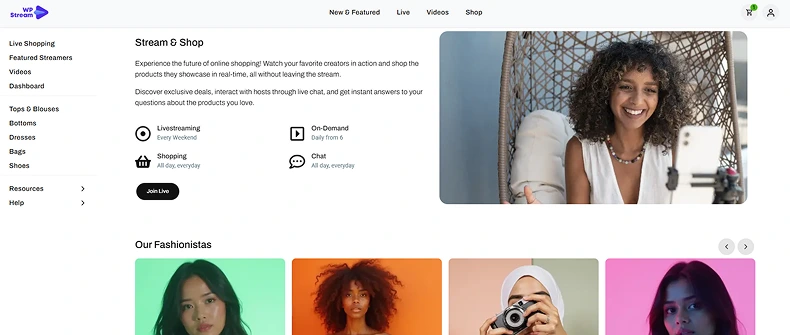
Here are the benefits of using a ready-to-go streaming theme as opposed to creating your own.
For most beginners, WordPress is the best mix of freedom and simplicity.
Keep It Secure
Always use HTTPS. Protect paid content with DRM and limit access to logged-in users. Utilize secure payment gateways, such as Stripe or PayPal. Simple steps like using strong passwords and regularly updating, keep both users and content safe.
Build and Launch Step by Step
Here is the WordPress route end to end, in the order you actually do it. A first pass takes an afternoon; the content is what takes weeks.
- Register your domain and hosting: Pick the domain, then any current WordPress host (see the requirements above). Skip the “streaming” hosting tiers.
- Install WordPress: One click on almost every host. Set the permalink structure to post name before you publish anything, because changing it later breaks your URLs.
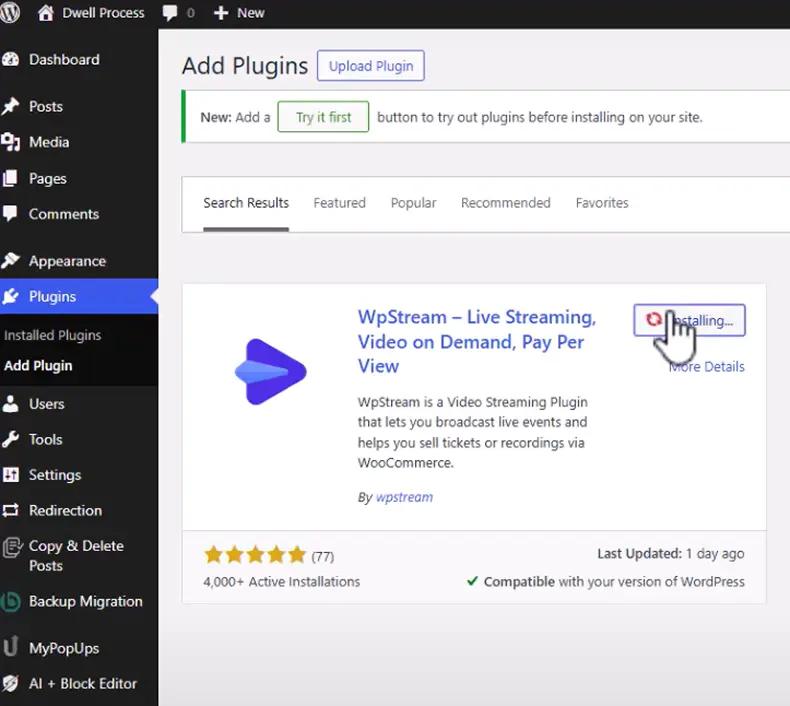
- Install the streaming plugin: In WordPress admin go to Plugins, Add New, search for WpStream, then install and activate. A quick-start wizard opens on activation and asks you to register an account with an email and password. Work through it: it walks you through going live and creating your first VOD, free or paid.
- Choose a theme: Any fast, clean theme works. A video-specific theme saves you building library and channel layouts by hand, and WpStream publishes a free one, so start there and change it later if you outgrow it.
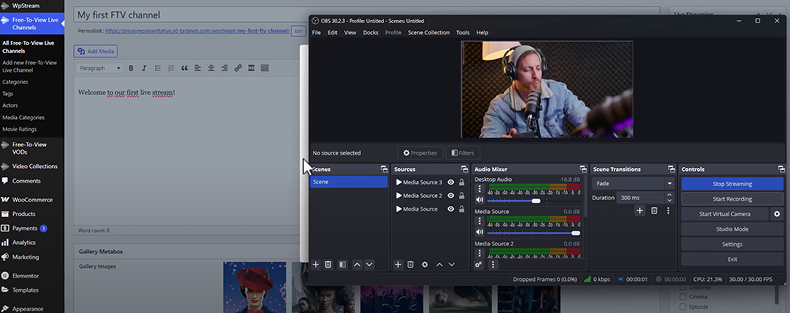
- Create your first free channel and test it: Go to Free-To-View Live Channels, Add New, give it a title and description, and enable the channel. Broadcast into it either straight from the browser or from an external encoder. Test before you build anything else: it takes five minutes and it tells you whether your upload speed is the real constraint.
- Connect the encoder (only if you are not using the browser): OBS Studio is free and is what most people use. The channel gives you a server URL and a stream key, which you paste into OBS under Settings, Stream, using the Custom service. Then set your output bitrate to something your upload speed can hold with room to spare.
- Add the paywall, if you are charging: For pay-per-view or ticketed streams, install WooCommerce and create the channel from WpStream, Live Channel, Add new Pay-Per-View Channel. Under Product Data, select Live Channel and set the price there. WooCommerce supplies the product, cart, checkout and payment flow, and the player stays locked until a logged-in viewer has actually bought access. For recurring memberships instead of single sales, add WooCommerce Subscriptions or a membership plugin like MemberPress.
- Build the pages that matter: A homepage that shows what is on now and what is new, a library or category page, a single video or channel template, and an account page. Four pages. Resist adding more before you have viewers.
- Upload your first recordings: Add your VODs and check playback on a phone, a laptop and a TV, on wifi and on mobile data. Recordings of your own live streams are the cheapest way to start a library.
- Add analytics and test the money path: Connect Google Analytics, then buy your own ticket with a real card and refund it. An untested checkout is the single most expensive thing to get wrong on launch day.
- Test everything, then launch: Multiple devices, browsers and connection speeds. Log out and look at every paid page as a stranger would, to confirm the gate actually holds.
When ready, announce your launch on social media or email. Start small but think long-term. Many successful platforms began with just a few videos.
Grow and Keep Your Audience
Launching is only the start of your streaming business. Growth stems from marketing, community engagement, and consistency.
Build Buzz Before and After Launch
Create excitement before going live. Use social media to share short clips, teasers, or countdowns. Set up a landing page to collect emails for updates. Early followers become your first community.
Once launched, continue promoting through:
- SEO: Optimize titles, tags, and descriptions. Blog posts around your niche attract search traffic.
- Social Media: Share highlights, trailers, or behind-the-scenes content to engage your audience and build excitement.
- Email Marketing: Send updates about new videos, events, or promotions.
Generally, sites that post updates regularly get more visitors.

Keep Viewers Engaged
Retention matters more than raw traffic. Offer regular new content and consider adding live events or Q&A sessions to enhance engagement. Interaction builds loyalty…live videos generate up to six times more engagement than recorded ones.
Make users feel part of a community. You can add comment sections, forums, or private chat groups for members. A strong community increases return visits and word-of-mouth growth.
Adjust and Improve
Part of knowing how to create a video streaming website is knowing how to track key numbers like watch time, new sign-ups, and churn rate. If users drop off early, improve your opening moments. If certain videos perform better, make more like them.
Experiment with pricing and offers. Try free trials, discounts, or ad-supported tiers. Even minor tweaks can lift revenue without hurting the viewer experience.
Lessons from Real Projects
Building a streaming website is strategic. Many developers on forums share lessons they have learned from their experiences.
Plan for Costs: The cost that surprises people is never the website, it is video delivery, and it scales with viewing rather than with signups. Price it per viewer hour before launch and re-check it every month: a platform fee of $1.99 per subscriber is invisible at 50 members and is $995 a month at 500. Whichever route you take, know the number at which your plan stops making sense.
Start Small, Then Grow: Many successful niche services like platforms for dancers, educators, or gamers, focus on a single passion group instead of competing with Netflix. Their users were loyal because the site felt personal and relevant.
Focus on Quality: Viewers forgive limited content, but not poor playback. Test your performance regularly and utilize a CDN for delivery.
Build Trust: Utilize clear design, reliable payment methods, and effective communication to establish trust. People return to platforms that feel safe and professional.
Moving Forward
Knowing how to create a video streaming website (like a Netflix-like streaming website) requires effort, but it is entirely possible with today’s tools. The key is to start small, learn quickly, and improve often. Our guide to building a Netflix-like website covers that build in detail.
Quick Checklist
- Define your niche and business model
- Choose a reliable host and domain
- Set up WordPress or another CMS
- Install your video and membership plugins
- Upload your first videos and test playback
- Launch with a basic marketing plan
- Track analytics and adjust content
Start with a few videos and a clean design. Keep pages light and fast. As you gain users, expand your content and features. Success comes from steady growth, not perfection on day one. Here’s the only list you’d ever need to create your live streaming website.
If done well, your streaming website can become a trusted destination for your audience…whether that’s fans, students, or communities worldwide.
FAQ
Not very. Tools like WordPress and plugins handle most of the work. Some basic web skills are helpful, but you can follow tutorials or hire someone for setup assistance.
Yes. Hosting like Cloudways and a WordPress site are inexpensive, and many plugins have free versions. Costs rise as you add users, but start small and scale as revenue grows. For WpStream, the video streaming theme and demos are free and you can also stream for free. If you want to grow, plans start at $24 per month.
With WordPress and ready-made plugins, a simple streaming site can be created in a few minutes to hours. Of course, it’s still a template that you need to replace images, text, and add content. But you can launch the site in a few days to weeks. Add more features once you gain traction.
On WordPress: a domain, standard hosting, and a streaming plugin from $36 as a one-time purchase (or $24 a month if you want quotas that reset). On a hosted all-in-one platform: from $49 a month, plus 5% to 10% of one-time sales and a per-subscriber fee of $0.99 to $1.99. A custom build is a different order of magnitude, and the agency Cleveroad publishes its own estimate of 999 hours and $97,000 and up for the same result.
Yes. What people mean by “like Netflix” is a browsable video-on-demand library behind a login, with subscriptions and a player that behaves well on a TV. On WordPress that is a video theme for the layout, a streaming plugin for the player and delivery, and a membership or WooCommerce paywall for access. What you cannot copy is the catalogue: licensing other people’s films is the genuinely expensive part, which is why the niche platforms that succeed start with content they own.
A live streaming site broadcasts as things happen, so it needs an encoder (OBS Studio is free), an ingest point, and an audience that shows up at a set time. A video on demand site serves recordings that viewers start whenever they like, so it needs a library, storage and a paywall, but no schedule. Most platforms end up doing both: broadcast live, record the broadcast, then keep the recording in the library.
If your streaming platform delivers the video, a CDN is already part of what you are paying for and you do not add your own. You only have to think about a CDN when you serve video files from your own server, and that is the route where every extra viewer costs you bandwidth.
Table of Content